How to Submit My Station
Attention! Register your radio on Sintoniza Radio
Adding your station to Sintoniza Radio is easy. Create your account, confirm your email address, then go to your profile and complete the process from the "Upload my radio" option.
1. Sign in to the site
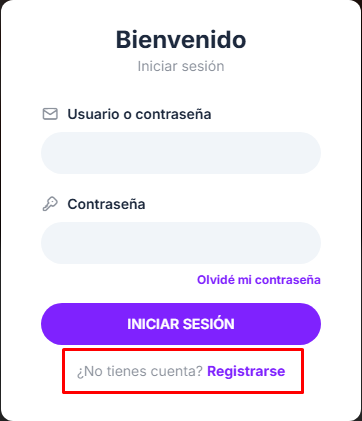
Go to Sintoniza Radio and press the "Sign in" button at the top right of the page.
2. Create your account
In the sign-in window, select "Sign up".
Then complete the requested information to create your account:
User
Email address
Password
3. Confirm your registration
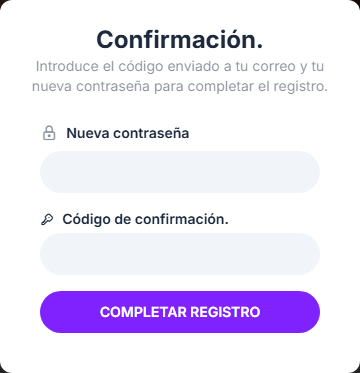
After registering, you will receive a confirmation code in your email.
Enter the code you received together with your new password and press "Complete registration".
4. Go to your profile
Once your account is confirmed, sign in with your username or email and password.
5. Upload your radio
Inside your profile, select "Upload my radio".
Complete the requested station information and send it so it can be reviewed and added to the platform.
VISUAL GUIDE TO COMPLETE THE STEPS CORRECTLY

Important
If you do not receive the confirmation code, also check your Spam, Junk, or Promotions folder.
Make sure your email address is written correctly before completing registration.
We are happy to have you here and help your radio reach more listeners.
Thank you for being part of the Sintoniza Radio community!